
 Free, built in
 MediaVerse
BuddyNext + MediaVerse
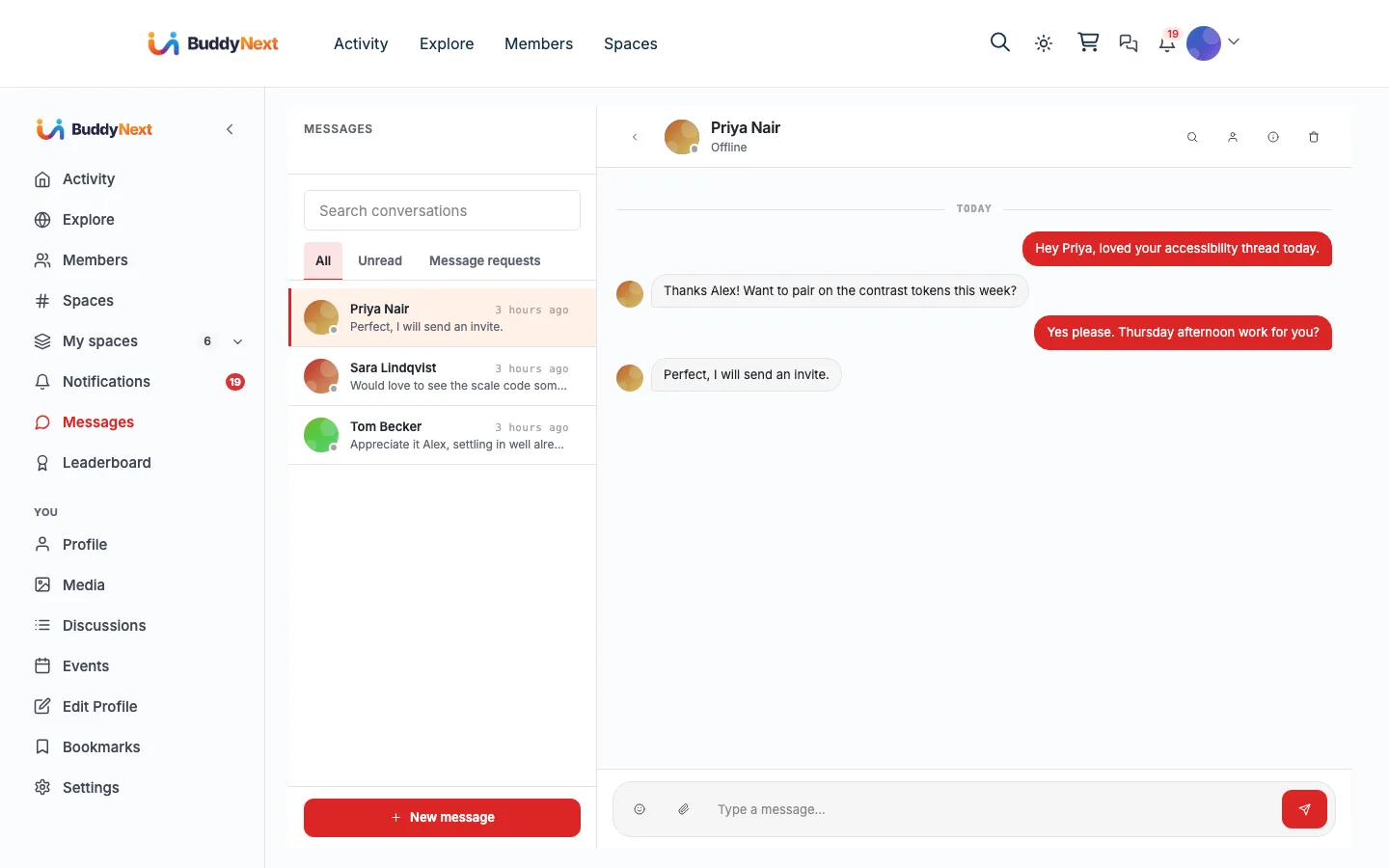
The messaging and media engine behind BuddyNext: native DMs, media posts, and a member media library.
What happens when someone uses it
One action, everywhere it lands
A member sends a message or posts media
- The one inbox Rendered at /messages/, privacy owned by BuddyNext
- Activity feed A shared media card, only if it was not attached to a post
- Media library Reachable from the Media link in the left rail
- Notification bell New messages and media favourites
The bridge self-guards on WPMediaVerse and quietly does nothing when it is not installed, so none of this appears until you turn it on.
What it changes
Your community with MediaVerse in it
Each of these is something a member can do the day you turn it on, and what it changes for whoever runs the place.
-
Message another member and have it land in the same inbox as everything else, at /messages/.
What changes
Members stop leaving for WhatsApp or Discord to have a private word, which is how a community quietly loses the half of its conversation it never sees.
-
Attach photos and files to posts and conversations, and find them again from the Media link in the left rail.
What changes
The community keeps its own media library instead of scattering it across chat apps where nothing is searchable a month later.
-
Decide who is allowed to DM them, with blocks and mutes checked before a message is ever delivered.
What changes
Opening up private messaging does not quietly make moderation harder, because BuddyNext owns the privacy rules rather than the messaging plugin.
-
Follow someone once and have it hold in both plugins, without repeating themselves.
What changes
The social graph stays one graph, so a connection means the same thing everywhere in the community.
How it works
The flow, step by step
- 1 WPMediaVerse is the engine; BuddyNext renders the inbox and owns privacy, so the bridge tells MediaVerse to stand down its own chat UI.
- 2 Sending a DM checks the recipient’s block list and DM-privacy preference first, then fires a BuddyNext new-message notification.
- 3 A standalone media upload schedules a deferred feed activity (Action Scheduler, about two minutes out) that only publishes if the media was never attached to a post.
- 4 Follows stay mirrored both ways between the two plugins, with a re-entrancy guard so they never loop.
For developers
The bridge self-guards on the partner plugin and no-ops when it is absent. Key hooks: mvs_can_send_message, mvs_message_sent, mvs_media_uploaded.
If WPMediaVerse is not installed
The media surfaces, the Media tabs and messaging all check for MediaVerse and stay hidden without it. Worth knowing that the messaging safety checks are deliberately not tied to the display settings: if they could be switched off independently, BuddyNext would carry on serving direct messages while the block list and privacy preferences quietly stopped applying to them.
What to check once it is on
Send a direct message between two test members, then block one and confirm the next message is refused with a reason rather than silently failing. Upload a public photo and confirm exactly one feed card appears, since the card is published on a short delay and a duplicate here means an upload surface is posting its own. Finally set a photo to private and confirm it does not reach the feed at all.
MediaVerse questions
- Which inbox do members use?
- BuddyNext's. MediaVerse's own chat panel, messages page and notifications are stood down when BuddyNext is present, so there is one inbox rather than two competing for the same conversation.
- Do blocks and privacy settings apply to direct messages?
- Yes, and they cannot be turned off separately from messaging. A member's choice of who may message them, from everyone down to nobody, is enforced on every send, and a blocked member is refused with a clear reason.
- Why does a photo take a moment to appear in the feed?
- The feed card is published on a short delay so that an upload posted through BuddyNext's own composer is not posted twice. If a card already exists for that media, the second one is skipped.
- Do private photos ever reach the feed?
- No. Only public uploads produce a feed card, and changing a post's privacy afterwards updates the privacy of the media attached to it.
- Is media searchable in the community?
- No. Media is found through the Media tabs on profiles and spaces and through the feed, not through community search.
- Which media notifications are emailed?
- New direct messages are emailed immediately and favourites go into the weekly digest. Reactions and mentions on media collect in the bell without email, because MediaVerse already emails those itself.
Turn it on
Setup
Default on. Install WPMediaVerse from BuddyNext, Integration Settings. DM access is governed by your existing BuddyNext privacy and moderation settings.